

Does AI recommend your products?
Perform a free audit.
Foundations
What exactly is Query Fanout?
Query fanout is a mechanism by which artificial intelligence (e.g. Google AI Mode, ChatGPT, e-commerce chatbots) understands and processes user queries. The system automatically breaks one question into multiple related sub-questions and searches various sources to then synthesize the results into a single overall answer.
The word "fanout" means branching out, spreading - here: distributing a query to multiple search channels, e.g. Google, Bing or data aggregators like Semly.
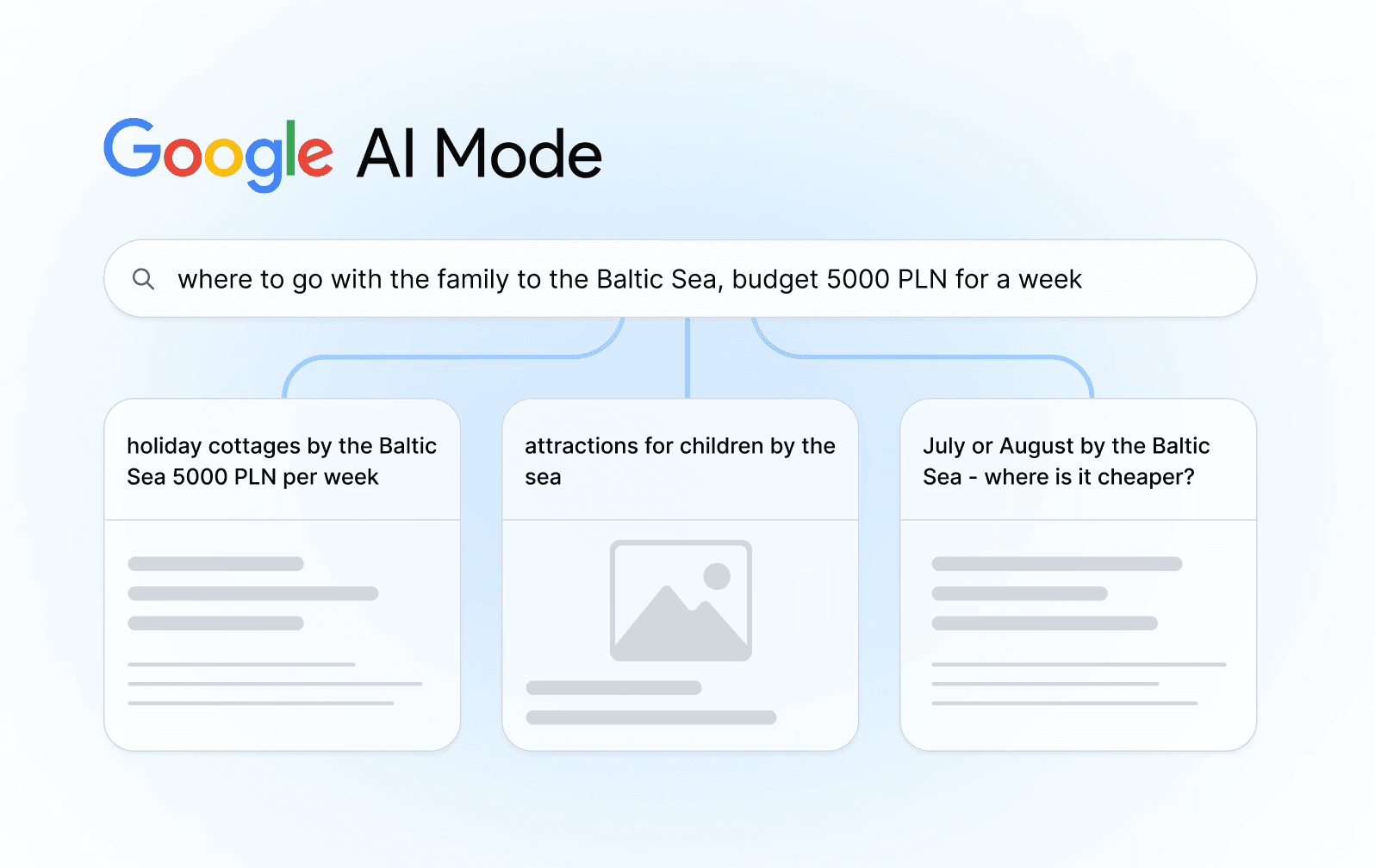
You type in Google AI Mode: "where to go with the family to the Baltic Sea, budget of 5000 zloty for a week."
In a traditional search, the system would look for pages containing the exact keyword. In query fanout, the system does just that:
Recognizing intent:
- Seekers: family with children
- Destination: seaside vacation
- Restriction: budget of 1000 EUR per week
- Location: Baltic Sea (Polish sea side)
- Time: undefined, but suggests summer vacation
Breakdown into subquestions:
- "The cheapest accommodation in the Baltic Sea for families"
- "Summer cottages in the Baltic 1000 EUR per week"
- "Where to go cheaply to the seaside with children in July"
- "Attractions for children at the seaside"
- "Which city is popular in the Baltic 2025"
- "How to get to the Baltic with your family cheaply"
- "Baltic vacations without food - budget options"
- "The best beaches for children in the Baltic Sea"
- "Where to stay with a child at the seaside - forum"
- July or August on the Baltic - where cheaper"
Simultaneous Search:
Simultaneous Search: Each of these queries is sent simultaneously to various sources - booking portals, travel blogs, forums, resort sites, YouTube, reviews on Google Maps.
Synthesis:
Synthesis: the system collects snippets from all sources, organizes them (e.g., the most popular/most recommended will appear higher), and presents them to the user in the form: "On the Baltic Sea the best is in Darlowo, here are the popular resorts with prices, here is the beach for children, and here are the travel options."
Why did Google introduce Query Fanout?
Search change history
Google operated for many years as follows:
- The user enters the keywords
- The algorithm looks for pages containing these words
- It sorts them by popularity and relevance
- Displays a list of links
This worked well for simple questions ("How much does an elephant weigh?"). But when the questions became more complicated ("What kind of car to take into the city if I drive a lot around town, have two kids, like to save fuel, but also want reliability and convenience?"), the traditional model began to fail
When the system recognizes that a question requires advanced reasoning, it turns on our version of the Gemini model. It breaks the question into various subtopics and sends multiple queries in parallel on your behalf. Instead of serving you a list of links, the system looks for the best bits of text, tables, images from each of these sources and assembles a coherent answer for you.
Elizabeth Reid, head of Google Search, Google I/O 2025
Practical benefits for the user
- Quick answer - without clicking through multiple pages
- Completeness - all aspects of the question are addressed
- Comparisons - the system automatically compares options
- Feedback - the system finds the experience of other users
- Update - answer contains the latest information
How does Query Fanout technically work?
Step 1: Intent Analysis (Intent Recognition)
When a user types in a question, the AI system first looks not at the words, but at the intent behind the question.
An example for an electronics store:
Question: "What video camera for a beginner vlogger"
Recognized intent:
- Product category: cameras
- User level: beginner
- Application: vlogging (YouTube/social media video)
- Existing skills: minimal
- Priority: ease of use, not professional capabilities
The system understands that this user will not buy a 5,000 EUR camera, but something in the £500-2000 range, with a simple interface, good stabilization and a built-in microphone.
Step 2: Decomposition of the query
Based on the recognized intention, the system carries out decomposition - breaks a single question into multiple logically related subqueries.
For a vlogger's camera, these could be:
- "The Best Cameras for Beginning Vloggers 2025"
- "How much does a good vlogging camera cost"
- "Camera or smartphone for vlogging - a comparison""
- "What camera has the best image stabilization"
- "Reviews - the best YouTube camcorders"
- "Camera for vlogging - what it must have (microphone, screen)"
- "Where to buy a vlogging camera in Poland"
- "Vloggers recommend - a camera to start with"
Each of these sub-questions answers a different aspect of the purchasing decision.
Step 3: Parallel Retrieval
This is the key part. Instead of searching one by one (first the price, then the reviews, then the specifications - and that would take time), all the sub-queries are searched for at the same time.
Pseudocode example (Python):
# Simplified pseudocode of what happens in the background
import asyncio
async def query_fanout_search(main_query):
    """
    Concurrent search for all subqueries
    """
    # We break down the main question
    sub_queries = decompose_query(main_query)
    # Result: ["vlogging camera beginner", "camera for YT reviews", ...]
    # We create tasks for each subquery
    tasks = []
    for sub_query in sub_queries:
        tasks.append(search_google(sub_query))
        tasks.append(search_youtube_reviews(sub_query))
        tasks.append(search_forums(sub_query))
        tasks.append(search_prices(sub_query))
    # We run everything simultaneously (asyncio)
    all_results = await asyncio.gather(*tasks)
    return all_results
A traditional search would be sequential. Query fanout parallelizes them (all at once). This reduces the response time from several seconds to about 1-2 seconds.
Step 4: Combine the results (Aggregation & Ranking)
Now the system has to do the hard thing: combine results from dozens of different sources in a way that makes sense. The algorithm used is Reciprocal Rank Fusion (RRF). I explain with a simple example:
Let's say we're looking for "best wireless headphones."
Results z subquestions 1 ("headphones for office work"):
- Sony WH-1000XM5
- Bose QC45
- Sennheiser Momentum
Results from subquestion 2 ("headphones - comfort test"):
- Bose QC45
- Apple AirPods Max
- Sony WH-1000XM5
Results from subquestion 3 ("headphones - price 2025"):
- JBL Live Pro 2
- Sony WH-1000XM5
- Anker Soundcore
RRF works like this:
- Sony WH-1000XM5: appears in results #1, #3, #2 → receives highest score
- Bose QC45: appears in results #2, 1 → average score
- The rest have lower scores
Final list:
- Sony WH-1000XM5 (most recommended in many ways)
- Bose QC45
- JBL Live Pro 2
Step 5: Synthesis and presentation
Now the system pulls from every source the most relevant passages:
- From the review: "The comfort of 8 hours of work"
- From the test: "ANC reduces noise by 95%"
- From the forum: "Super for remote work"
- From the price tag: "£349 on promotion"
He finally presents these results to the user in the form of a single coherent text with quotes from sources.
Practical implications for online stores
Does this mean the end of traditional SEO?
No. Traditional search still exists and will continue to exist. But in addition to it, a new channel is emerging - visibility in AI responses.
Traditional SEO (ranking for specific keywords):
User searches for: "laptop for learning programming"
→ Your site appears in position 3
→ The user clicks the link
→ They land on your page
Query Fanout (appearing as part of the AI response):
→ AI Mode generates a response with a sentence:
"Popular choices are: [quote from site A], [quote from site B],
[quote from your site]"
→ The user sometimes clicks the links, sometimes not, but your brand
appears in the answer
Both channels now operate in parallel.
What is changing for the store?
1. The content structure on the site needs to change
The old approach (optimized for traditional SEO):
Title: Laptop for programming
The best laptop for programming is something that has...
[two pages of dense text]
This works for a human reader, but AI Mode needs more structure.
New approach (under query fanout):
# Laptop for Programming – Full Guide 2025
## What do you need to know before buying a laptop for programming?
### 1. Processor – Intel or AMD?
AMD Ryzen 7 is faster for code compilation...
[specific tests]
### 2. RAM – how much do you need?
- For Python: 8-16 GB
- For Web Dev: 16 GB minimum
- For AI/ML: 32 GB
### 3. SSD Drive – how much?
Minimum: 512 GB
Recommendation: 1 TB
[Each point has a clear, self-contained answer]
## Comparison of popular models
| Model | Processor | RAM | SSD | Price | Rating |
| --- | --- | --- | --- | --- | --- |
| Model A | Ryzen 7 | 16GB | 512GB | 3999 | 9.2 |
| Model B | i7-13 | 16GB | 1TB | 4499 | 9.5 |
[Each row is a fragment that AI can extract]
## FAQ – frequently asked questions
Q: Is a MacBook good for programming?
A: Yes, but...
Q: How much does a good laptop for coding cost?
A: From 700 EUR...
[Each Q&A pair is a potential sub-query]
## User Reviews
"I bought this laptop, I code in Python and now I'm earning..." (15 positive reviews)
Can you see the difference? The second structure allows AI to pull fragments for each subquery.
2. Structured data (Schema Markup) is now an obligation
Schema.org is a way to "tell" AI exactly what the numbers and words on your page mean.
Example:
The laptop costs 1000 EUR
<script type="application/ld+json">
{
  "@context": "https://schema.org",
  "@type": "Product",
  "name": "Programming Laptop Model X",
  "image": "https://example.com/laptop-x.jpg",
  "description": "High-performance laptop for coding.",
  "brand": {
    "@type": "Brand",
    "name": "BrandName"
  },
  "offers": {
    "@type": "Offer",
    "price": "945",
    "priceCurrency": "EUR",
    "availability": "https://schema.org/InStock"
  },
  "aggregateRating": {
    "@type": "AggregateRating",
    "ratingValue": "4.8",
    "ratingCount": "125"
  }
}
</script>
That way, when AI searches for "aptops for programming up to 945 EUR," your site shows up in the results.
3. Authority and citations important more than ever
Query fanout favors sources that are cited multiple times in AI answers. If your site appears in answers to multiple sub-queries - that means you are an authority.
How to build authority?
- Write about what you know best
- Add specific data, tests, numbers
- Quote others and link - it shows that you are knowledgeable
- Build backlinks from reputable sources
- Update content regularly
Practical tips
Guide 1: Mapping out Query Fanout for your product
Suppose you run a powerbank store.
Step 1: Select the core query (core query)
"Best powerbank for up to 150 EUR"
Step 2: Expand with context
Application:
- For the phone
- For laptop
- For travel
- To work
Features:
- Capacity (mAh)
- Charging speed
- Size
- Weight
User profile:
- Student
- Clerk
- Traveler
- Gamer
Type of comparison:
- Competition
- Previous generation
- Alternatives
Step 3: Generate specific subqueries
ZASTOSOWANIE:
USAGE:
- "power bank for iPhone"
- "power bank for laptop"
- "power bank for vacation – test"
- "power bank for office work"
FEATURES:
- "how many times will a power bank charge a phone"
- "power bank 20000 mAh vs 30000 mAh"
- "power bank fast charging – how many watts"
COMPARISONS:
- "Xiaomi vs Samsung power bank"
- "cheap vs expensive power bank – difference"
- "best power bank 2025 – ranking"
PROBLEM-SOLVING:
- "power bank is not charging – what to do"
- "power bank discharges quickly"
- "power bank gets hot"
Step 4: For each sub-query, prepare a section on the page
## How many times will a 20000 mAh power bank charge my phone?
It depends on your phone's battery capacity:
- iPhone 14 (3200 mAh): ~6 times
- Samsung Galaxy S24 (4000 mAh): ~5 times
- OnePlus 12 (5400 mAh): ~3.5 times
- iPad Air (8600 mAh): ~2 times
**How is it calculated?**
20000 mAh (power bank) / 4000 mAh (phone) = 5 charges
(in practice less due to energy loss)
## Will a 20000 mAh power bank charge a laptop?
Yes, but...
- It must have a USB-C Power Delivery output
- It must be at least 65W
- Older laptops (with Micro USB) – no
Our model: 100W, USB-C PD, charges MacBook Air in 2.5 hours.
## Power bank for vacation – will it fit?
- Dimensions: 12 x 7 x 3 cm
- Weight: 420 g
- Fits in a backpack, toiletry bag, pocket of a large handbag
- Ideal for vacation (doesn't take up space)
[etc.]
Guide 2: Writing content under Query Fanout - template
Header template (for each aspect)
# [Product] – Complete Guide [Year]
## What should you know before buying [product]?
### 1. [First Critical Aspect]
- Definition for beginners
- Why is it important
- How to check it in practice
### 2. [Second Aspect]
[same as above]
### 3. [Third Aspect]
[same as above]
## Comparison of popular models
| Name | Spec1 | Spec2 | Price | Review |
| --- | --- | --- | --- | --- |
| Model A | | | | |
## FAQ – frequently asked questions
Q: [Question that appeared in Google Trends]
A: [Specific answer]
## User Reviews
"User story, why they bought it, what are their experiences"
Guide 3: Implementation Schema.org for the product
<!DOCTYPE html>
<html>
<head>
<script type="application/ld+json">
{
  "@context": "https://schema.org",
  "@type": "Product",
  "name": "Power Bank 20000 mAh SuperCharge",
  "image": ["https://...1.jpg"],
  "description": "Power bank under 35 EUR with fast charging",
  "brand": {
    "@type": "Brand",
    "name": "TechBrand"
  },
  "offers": {
    "@type": "Offer",
    "url": "https://...product",
    "priceCurrency": "EUR",
    "price": "29.99",
    "availability": "https://schema.org/InStock"
  },
  "aggregateRating": {
    "@type": "AggregateRating",
    "ratingValue": "4.7",
    "ratingCount": "348",
    "bestRating": "5",
    "worstRating": "1"
  },
  "review": [
    {
      "@type": "Review",
      "author": {
        "@type": "Person",
        "name": "User John"
      },
      "reviewRating": {
        "@type": "Rating",
        "ratingValue": "5"
      },
      "reviewBody": "Great power bank, highly recommended"
    }
  ]
}
</script>
</head>
</html>
As a result, AI knows exactly:
- What is the price
- How many opinions do you have
- Is it available
- What users are saying about it
Query Fanout in real-world scenarios
Scenario 1: Customer seeks "comparison"
"Gravel bike or road bike - which one to choose?"
Subqueries that AI generates:
- "Gravel bike - what it is, for what"
- "Road bicycle - parameters, purpose"
- "Gravel vs road - technical differences"
- "Gravel or road for bicycle tourism"
- "Gravel or road - price in Poland"
- "Opinions - which bike is better for a beginner"
- "Tests - gravel vs road grip"
What your site should contain to appear:
- Definitions (gravel + road)
- Comparison in the table
- Real user reviews
- Prices (links to stores)
- Practice tests
- For whom each type
Scenario 2: The customer has a specific problem
Sub-questions:
- "Why wireless headphones discharge quickly"
- "Bluetooth headphones - how to extend working time"
- "Which headphones have the longest runtime"
- "Changing the battery in headphones - is it possible"
- "Headphone battery problems - forum"
What your content should include:
- Causes (why it happens)
- Guide (how to extend life)
- Comparison of handsets with the best battery
- Information about the service
- Technical advice (battery calibration)
Scenario 3: Customer compares brands
"Xiaomi or Samsung - smartphone 2025"
Sub-questions:
- "Xiaomi vs Samsung - comparison of specifications"
- "Xiaomi or Samsung - what the experts recommend"
- "Xiaomi - user reviews 2025"
- "Samsung - user reviews 2025"
- "Xiaomi or Samsung - which is better for photos"
- "Xiaomi vs Samsung price"
- "Xiaomi vs Samsung service in Poland"
What it should include:
- Technical comparison in the table
- Editorial opinions
- Photos from cameras (photo comparison)
- Prices in Polish stores
- Service availability
- Warranty
Technique - code and implementation
Code 1: Generate subqueries from GPT-5 (python)
import openai

def generate_sub_queries(main_query, num_queries=10):
    """
    Generates sub-queries for the main question
    """
    prompt = f"""
    You are an expert in SEO and AI Search Optimization.
    The user asked the following question:
    "{main_query}"
    Generate {num_queries} related sub-queries that the user
    might have had in mind or that an AI Mode could generate.
    The sub-queries should cover:
    - Definitions and explanations
    - Comparisons and alternatives
    - Prices and availability
    - Reviews and experiences
    - Problem-solving
    Return only the list of sub-queries, one per line.
    """

    response = openai.ChatCompletion.create(
        model="gpt-5",
        messages=[
            {"role": "user", "content": prompt}
        ],
        temperature=0.7,
        max_tokens=1000
    )

    sub_queries = response.choices[0].message.content.strip().split('\n')
    return [q.strip() for q in sub_queries if q.strip()]

# Example usage:
main_q = "Which power bank to choose under 50 EUR"
subs = generate_sub_queries(main_q)

for i, sub in enumerate(subs, 1):
    print(f"{i}. {sub}")

# Result:
# 1. How many mAh should a phone power bank have
# 2. Power bank 20000 mAh vs 30000 mAh – which is better
# 3. Best power banks under 43 EUR 2025
# etc.
Code 2: Query Fanout simulation - multi-channel search (python)
import asyncio
from typing import List, Dict

class QueryFanoutSimulator:
    """
    Simulates query fanout operation
    """
    def __init__(self):
        self.databases = {
            'products': self.search_products,
            'reviews': self.search_reviews,
            'forums': self.search_forums,
            'prices': self.search_prices,
            'youtube': self.search_youtube
        }

    async def execute_fanout(self, main_query: str, sub_queries: List[str]) -> Dict:
        """
        Executes query fanout for the main question
        """
        print(f"Main query: {main_query}\n")
        print(f"Generated sub-queries ({len(sub_queries)}):")
        for sq in sub_queries:
            print(f"  - {sq}")

        print("\n--- Simultaneous searching ---\n")

        # For each sub-query, we search all databases simultaneously
        tasks = []
        for sub_query in sub_queries:
            for db_name, search_func in self.databases.items():
                tasks.append(
                    self._search_with_metadata(db_name, search_func, sub_query)
                )

        # Execute all simultaneously
        results = await asyncio.gather(*tasks)

        # Aggregation of results
        aggregated = self._aggregate_results(results)
        return aggregated

    async def _search_with_metadata(self, source: str, search_func, query: str):
        """
        Search with metadata (which source, ranking)
        """
        results = await search_func(query)
        return {
            'source': source,
            'query': query,
            'results': results,
            'count': len(results)
        }

    async def search_products(self, query: str) -> List[Dict]:
        """Simulation of product search"""
        await asyncio.sleep(0.5)  # Delay simulation
        return [
            {'title': f'Product A for "{query}"', 'rank': 1},
            {'title': f'Product B for "{query}"', 'rank': 2}
        ]

    async def search_reviews(self, query: str) -> List[Dict]:
        """Simulation of reviews search"""
        await asyncio.sleep(0.3)
        return [
            {'title': f'Review: {query}', 'rank': 1, 'rating
Code 3: Passage extraction (python)
import re
from typing import List

def extract_passages_for_fanout(content: str, query: str) -> List[str]:
    """
    Extracts content passages that answer the sub-query
    """
    # Splitting into paragraphs
    paragraphs = content.split('\n\n')
    relevant_passages = []

    for para in paragraphs:
        # Searching for important words from the query
        score = calculate_relevance(para, query)

        if score > 0.6:  # Threshold: 60% relevance
            # Limiting to 2-3 sentences (fragment)
            sentences = para.split('. ')
            passage = '. '.join(sentences[:3]) + '.'

            relevant_passages.append({
                'text': passage,
                'score': score,
                'length': len(passage)
            })

    # Sorting by score
    relevant_passages = sorted(
        relevant_passages,
        key=lambda x: x['score'],
        reverse=True
    )

    return relevant_passages[:5]  # Top 5 fragments

def calculate_relevance(text: str, query: str) -> float:
    """
    Calculates how relevant the text is to the query (0-1)
    """
    query_words = query.lower().split()
    text_lower = text.lower()

    # Generator expression to count matches
    matches = sum(1 for word in query_words if word in text_lower)

    relevance = matches / len(query_words) if query_words else 0
    return min(relevance, 1.0)  # Max 100%

# Example usage:
content = """
A power bank is a device that stores energy and charges your phone.

20000 mAh means capacity – the more mAh, the more times it charges the phone.

A power bank for office work should be compact and convenient.

Our power bank weighs only 300 grams and fits in a handbag.

Fast charging is an important feature. Our model supports 65W fast charging.
"""

passages = extract_passages_for_fanout(content, "power bank for office work")

for i, p in enumerate(passages, 1):
    print(f"{i}. (score: {p['score']:.2f})")
    print(f"   {p['text']}\n")

# Result:
# 1. (score: 0.80)
#    A power bank for office work should be compact and convenient.
#
# 2. (score: 0.40)
# Our power bank weighs only 300 grams...Errors and pitfalls
Mistake 1: Writing only for humans, not for AI
The downside:
2025 Bestseller Power Bank! Our products guarantee satisfaction.
Buy now and save 10 EUR. Free shipping on orders over 30 EUR...
Why bad? AI Mode doesn't know:
- Whether it's a powerbank for your phone or laptop
- How many mAh has
- How much does it cost
- What kind of opinions it has
Good site:
## What is a 20000 mAh power bank?
A power bank is a charging device with a capacity of 20000 mAh.
### How many times will it charge a phone?
- iPhone 14: 6 times
- Samsung S24: 5 times
### Price
40 EUR (promotion from 47 EUR)
### Reviews
Rating: 4.8/5 (348 reviews)
AI can draw from this: capacity, application, price, opinions.
Error 2: Unfinished articles
Many stores have articles like "Article in preparation" or "Coming soon." This is invisible to AI Mode - the article is ignored.
Rule: Publish complete articles. If you don't have the time, many short articles are better than one unfinished long one.
Error 3: No structural data
Without Schema:
Headphones cost 70 EUR
With Schema:
<span itemscope itemtype="https://schema.org/Offer">
  <span itemprop="price">70</span>
  <span itemprop="priceCurrency">EUR</span>
</span>
Without Schema, AI may think it is the year or model number. With Schema - it knows it's the price.
Mistake 4: Copying the competition
If all stores write identically ("The best powerbank is..."), none will stand out. Query fanout favors a unique perspective.
Best practice:
- Your story (how you came up with the idea)
- Your tests (you checked yourself)
- Your opinions (what you think)
This AI will take more readily.
FAQ - Frequently asked questions
Does Query Fanout apply to all industries?
No. It is most applicable to industries where decisions are complex:
- E-commerce (product selection)
- Tourism (travel planning)
- Tips (how to do something)
- Education (learning something)
Less applicable:
- Factual inquiries ("Who became president of Poland in 2025?")
- Realtime information (weather, rates)
How long does it take to adapt a store under Query Fanout?
For a small store (50-100 products): 2-4 weeks, for medium (1000 products): 2-3 months, for a large one (10000+ products): 6 months+
This is not a one-time job - it is an ongoing process.
Will a well ranked product traditionally, be visible in AI Mode?
Usually yes, but not always. AI Mode has different criteria than traditional SEO. It is possible that you will rank high in traditional search, but not in AI Mode (or vice versa). That's why both strategies are important.
Is Query Fanout changing the way, getting traffic from Google Ads?
For now, no - Google Ads still works. But long-term, if more and more people use AI Mode instead of traditional search, the business model may change. It's worth investing in other channels (email, social media, partnerships).
Does ChatGPT also use Query Fanout?
ChatGPT uses an advanced version (asks the user for explanations, breaks down queries internally itself). But it doesn't have visibility like Google AI Mode. Other tools:
- Perplexity AI - uses query fanout explicitly
- Claude - has his own method
- Store chatbots - may have a simplified version
Does my content have to be literally on my site?
No. AI Mode can also quote passages from other sources. But if you have your own site - it greatly increases the chances of visibility in replies.
Is AMP or mobile-first important for Query Fanout?
Yes, but not as for traditional SEO. AI Mode important are:
- Ability to check content
- Data structure
- Authority
- Update
But not necessarily the speed of the site (although a fast site always helps).
Should I hire a copywriter now?
If you have not had before - yes. Query Fanout requires a lot of, high quality content. One copywriter should write an article per week (at least).
Glossary
AI Mode - google Search mode, where answers are generated by AI (instead of a list of links)
Aggregation - combining results from multiple sources into a single answer
Asyncio - python library for concurrent execution of tasks
Authority - google's knowledge that a site is trustworthy on a given topic
Backlink - link from another site to yours
Chatbot - a program that talks to the user
Chunk (Piece) - a small piece of text (e.g., one paragraph)
Core Query - the main question we start with
Decomposition - breaking one question into many smaller questions
Embedding - the transformation of text into numbers (vectors) that represent meaning
Fanout - dissemination, atomization (here: dissemination of inquiry)
Gemini - google's AI model (equivalent to ChatGPT)
Generator (LLM) - aI model that generates text
Hallucination - when AI makes up information that is not true
Intent Recognition - recognizing what the user really wants (not just what they wrote)
LLM (Large Language Model) - large language model (ChatGPT, Gemini, Claude)
Passage Extraction - pulling out parts of the text that are relevantne
Query - question, inquiry
Query Decomposition - breaking a question into sub-questions
Query Fanout - dissemination of questions into multiple sub-queries by AI
RAG (Retrieval-Augmented Generation) - information retrieval + answer generation
Reciprocal Rank Fusion (RRF) - an algorithm to combine results from multiple sources
Relevance - whether the result is relevant to the query
Retrieval - search, looking for information
Schema.org - standard for tagging data on pages
Semantics - meaning of words and texts
SEO - search engine optimization
Sub-query - subquery, smaller question
Synthesis - combining information from multiple sources
Vector Database - database storing text as vectors
Vector Similarity - how similar the two texts are
Checklist - what to do in your store?
- Analysis - Check how Query Fanout works for your main products (search Google AI Mode)
- Mapping - Create a list of sub-queries for the top 10 products
- Content audit - Check which pages already have fragments addressing sub-queries
- Structure - Reorganize product pages: add FAQs, add comparisons in tables, add user reviews, add "What you need to know" sections
- Schema - Implement Schema.org on all product pages
- Content - Write articles on "buying guide" for top categories
- Backlinks - Start building authority (articles on external sites)
- Monitoring - Track visibility in AI Mode (new tools make this possible)
- Iteration - Analyze sub-queries and update content monthly
Summary
Query Fanout is not the future - it's already the present. As of May 2025, Google AI Mode is in production, and competitors are keeping up (ChatGPT, Claude, Perplexity).
Key points to remember:
- Query Fanout is breaking a question into subqueries - AI is looking for them in parallel
- Traditional SEO still exists - but a new channel appears next to it (visibility in AI Mode)
- Content structure is changing - instead of one text for one keyword, you write a complete guide addressing multiple aspects
- Schema.org is now a must - AI must understand what the numbers and words on your page mean
- Authority more important than ever - AI favors sources that appear repeatedly in responses
- This is a marathon, not a sprint - implement slowly, test, iterate
Query Fanout gives you new possibilities for your store. You don't have to be a programmer - you can start by analyzing how Query Fanout works for your products, mapping sub-queries, and preparing better content.
The rest will come naturally.
Sources
- Google I/O 2025 - Elizabeth Reid, Head of Google Search - "AI Mode and Query Fanout Technique"
- fillrank.co.uk, Senuto.com, seo-www.pl, digital.rp.pl, 4media.com
- Google AI Mode Official
- Microsoft Azure AI Docs
- Haystack.deepset.ai - Advanced RAG Patterns
- OpenAI API Documentation - LLM Prompting
Share:
